
To connect SCOUTz to Autotask for prospect tracking, use a reviewed evidence handoff: record dated findings against the correct prospect account, then assign a follow-up owner. Instead of repeatedly copying disconnected scan details, use the same account-note template and verification process; this guide covers that manual workflow, not a native connector or automatic sync.
- To connect scoutz to autotask, start with a reviewed manual handoff rather than assuming a native integration.
- SCOUTz supplies dated cybersecurity evidence; your MSP controls account matching, interpretation, and follow-up.
- Keep public-domain observations separate from customer-authorized Microsoft 365 configuration evidence.
- Preserve the original baseline and record rescans separately so changes remain traceable.
Why this matters
A prospect record needs more than a finding pasted into a note. Your salesperson needs to know what ran, when it ran, what the result supports, and what remains unknown. Without those boundaries, a technical observation becomes an unsupported sales claim.
SCOUTz cybersecurity prospect intelligence is best for MSPs preparing evidence-led prospect conversations. The SCOUTz platform prepares the conversation. Your team remains responsible for the relationship, the interpretation, and the sale.
For your 2026 prospect-tracking process, separate evidence from sales activity. A published email-security policy belongs in the evidence record; a request for a discovery meeting belongs in the activity history. Neither establishes the other.
The practical outcome is a prospect record that another team member can understand without reconstructing the assessment. It should support a specific question, identify an owner, and preserve the evidence behind the conversation.
Before you start
- Confirm that you can access the assessment output and edit the intended prospect record in Autotask. Assign a sales owner and a technical reviewer; one person can hold both responsibilities.
- Gather the prospect’s business identity, confirmed domain, assessment source, run date, and permitted audience. For Microsoft 365 evidence, confirm customer authorization and the scope actually read.
- Resolve the matching rule before copying anything. A business name alone is insufficient when subsidiaries, trading names, or shared domains create ambiguity. Keep internal operator material separate from client-safe wording.
Treat this as an operational handoff. The instructions below use suggested record labels, not claimed Autotask interface labels. Put the information in the account notes, activity records, or configured fields your Autotask administrator has approved.
The client’s October 15, 2026 product reference identifies Microsoft 365 Review and Evidence Reports as Open Beta. Confirm the current report experience before making it a dependency in your team’s procedure. No step below requires an assumed export button, webhook, API endpoint, or integration menu.
Choose the evidence scope
Public-domain observations and authorized tenant evidence answer different questions. Choose the scope that supports the conversation, then preserve its limits in the account record.
| Evidence option | Best for | Useful contribution | Limit to preserve |
|---|---|---|---|
| Public Domain Review | Preparing questions about externally observable domain and email-security conditions | Dated public-domain observations | Cannot establish tenant Conditional Access coverage, application permissions, or internal sharing configuration |
| Customer-authorized Microsoft 365 Review | Discussing assessed tenant configuration with the customer’s permission | Read-only configuration and metadata evidence | Coverage depends on what was authorized and readable; it excludes mail, files, chats, documents, and prompts |
Both scopes support preparation. Neither should be presented as proof that a prospect wants to buy or that a breach occurred.
Match account
- Find the existing prospect record before creating another. Compare the organization name with the assessed domain and the account context your team already holds.
- Confirm that the reviewed domain belongs to the business unit under discussion. Record any uncertainty instead of attaching evidence to the nearest name match.
- Choose 1 account record as the tracking destination for that prospect. If your organization separates parent and subsidiary records, document which entity the evidence describes.
- Assign the person responsible for the next conversation. Keep technical review responsibility visible alongside that sales ownership.
- Write down your matching decision. Include the domain, the relevant business entity, and any exclusions, such as an unrelated subsidiary.
Expected result: another team member can identify the assessed organization and explain why the evidence belongs on that record.
Match the account before moving the finding. A precise observation attached to the wrong organization produces an unreliable prospect history.
Record evidence
- Open the assessment output and preserve its original check name, affected object, source, and run date. Keep the report reference or approved evidence location alongside the summary.
- Identify the source as public-domain observation or customer-authorized Microsoft 365 evidence. Do not merge those scopes into a single undifferentiated assessment.
- Copy the observed condition without upgrading its meaning. A monitoring-only DMARC policy supports a discussion about intended enforcement and reporting; it does not establish account compromise.
- Record evidence state separately from coverage. Preserve supplied states such as Observed, Inferred, Unknown, or Unreadable. Keep coverage labels such as Partial or Permission limited distinct.
- Add the limits that affect interpretation. Include unread sources and declared non-reads under NOT ASSESSED THIS SCAN when that label applies to the source output.
Expected result: the account record explains what was assessed, what was observed, and what the assessment cannot establish.
Use this suggested note structure for your 2026 operating procedure. These labels describe the information to retain; they are not product interface fields.
| Suggested label | What to record |
|---|---|
| Account and domain | Confirmed business entity and assessed domain |
| Source and run date | Assessment source, original check name, and dated run |
| Observation | The condition reported and affected object |
| Evidence state | The state attached to the evidence |
| Coverage and unknowns | Assessed scope, permission limits, unread sources, and exclusions |
| Possible consequence | A bounded implication supported by the observation |
| Owner and next choice | Responsible person, discovery question, and proposed action |
| Baseline reference | Approved location of the original evidence |
Review wording
- Separate the observation from its possible consequence. State the technical condition first, then explain the business question it raises.
- Add a boundary sentence. For a public-domain review, make clear that internal tenant configuration was outside that evidence scope.
- Write a discovery question the prospect can answer. For a monitoring-only DMARC policy, ask who reviews reports and whether monitoring-only remains the intended policy.
- Have the designated reviewer check the source, date, wording, and audience. Remove unsupported claims of compromise, urgency, buying intent, or unresolved work.
- Save the approved wording in the prospect record. Keep detailed operator material in its authorized location rather than copying it into every sales activity.
Expected result: the salesperson has a defensible conversation starter rather than a security accusation.
Organize the handoff around 3 sections: Evidence, Insight, and Proof. Evidence records what ran. Insight explains the supported question or consequence. Proof records what changed after an agreed action and a comparable rescan.
A finding alone is not a reason to call. The useful reason is a consequence you can explain, a boundary you can defend, and a question the prospect can resolve.
Assign follow-up
- Create the next activity using your team’s approved Autotask process. Include the owner, intended audience, agreed timing, and discovery question.
- Reference the reviewed evidence note instead of reproducing the entire finding in multiple places. Keep the original run date visible in any summary used for outreach.
- Record the prospect’s response as a separate fact. Distinguish a confirmed statement from an MSP hypothesis or an unanswered question.
- Ask for permission before expanding into customer-authorized Microsoft 365 review. Public-domain evidence does not grant tenant access.
- Record the next choice: further discovery, an authorized assessment, a proposal discussion, a process change, or no action.
Expected result: every follow-up has an accountable owner and an evidence-backed purpose. The activity history shows what the prospect actually said rather than what the assessment led your team to assume.
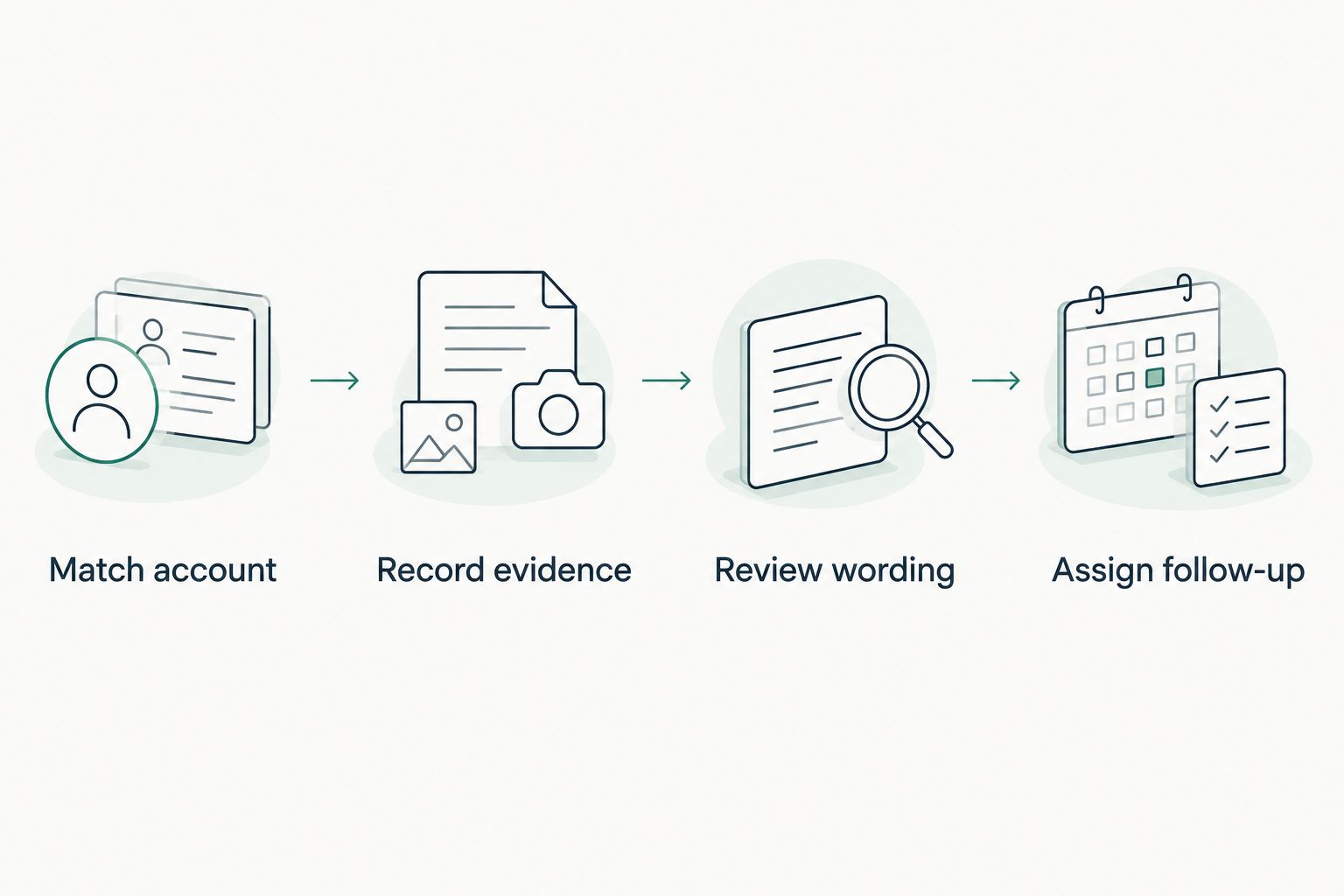
The handoff follows this sequence: Match account, Record evidence, Review wording, Assign follow-up. Keep that order when training another salesperson.
Update the prospect record after a rescan
A second workflow starts when you have new evidence for the same prospect. Use it to preserve change history, not to overwrite the original observation.
- Match the new assessment to the same account and affected object. Confirm that the domain or tenant scope has not changed.
- Compare the new run with the pinned baseline. Check whether the source, assessment scope, permissions, and coverage are comparable.
- Record the new observation with its own run date. Describe what changed only where the comparison supports that statement.
- Keep unchanged findings separate from unread or unassessed sources. A source disappearing from the new review does not establish that its condition was corrected.
- Update the follow-up owner and next choice after review. Retain the original evidence so the account history explains the decision.
For a 2026 rescan, preserve the full run date supplied by the assessment rather than reducing it to a year-only label. A dated comparison is useful only when readers can distinguish the baseline from the later review.
Proof requires comparable evidence. A permission change can alter visibility without changing the underlying configuration. Record that distinction before describing a result as verified.
Troubleshooting
Evidence appears on duplicate prospect records
Pause follow-up until the account owner resolves the identity match. Choose the canonical record through your approved account-management process, then retain the assessment history there without creating conflicting summaries.
Use domain and business-entity context together. Shared infrastructure does not establish shared ownership.
A finding is marked resolved after it disappears
Compare coverage before comparing outcomes. Check whether the later assessment read the same source with comparable permissions and scope.
If the evidence is unreadable or not assessed, record that state. Keep the outcome unknown until a comparable review supports a conclusion.
Sales copy claims a breach or buying intent
Return to the original condition and remove the unsupported conclusion. A breach-data match is distinct from a compromised user; a public event is context rather than proof of buying activity.
Have the technical reviewer approve the corrected wording before the next outreach activity.
The team expects automatic synchronization
Use the reviewed manual handoff as the operating procedure unless a specific integration has been documented and tested. Do not treat a menu reference, ticket-ready text, or another platform’s connector as evidence of an Autotask connection.
Keep any future automation separate from the working procedure until account matching, permissions, duplicate handling, and failure reporting have been validated.
Customize your workflow
Start with 1 prospect account and complete the full handoff before adopting the template across your team. Confirm that the salesperson can find the evidence, understand its boundaries, and identify the next owner without help from the person who wrote the note.
Then extend the record for proposals and QBRs. Keep the condition, affected object, unknowns, and recommended outcome separate from the vendor choice. Your MSP decides whether the appropriate response is a service, a project, a process change, a product, or nothing.
For your 2026 workflow review, check that the original evidence remains accessible and that follow-up notes preserve prospect statements accurately. Expand the process only after those basics work.
The domain-scan-to-first-call evidence packet workflow covers the preparation stage before the account handoff.
FAQ
How do I connect SCOUTz to Autotask for prospect tracking?
Use a reviewed manual handoff: match the prospect account, record dated evidence, review the wording, and assign follow-up. This guide does not establish a native connector or automatic synchronization.
Do I need an API key for this workflow?
The manual workflow described here does not require an API key. It requires authorized access to the assessment output and permission to update the intended prospect record.
Can I use public-domain evidence to assess Microsoft 365 controls?
Public-domain observations cannot establish internal Microsoft 365 controls such as Conditional Access coverage or application permissions. Those questions require appropriately authorized internal evidence.
What should I copy into the prospect record?
Record the source, check name, run date, affected object, observation, evidence state, coverage, unknowns, and next owner. Preserve an approved reference to the original evidence.
Should a security finding change the prospect’s sales stage?
A security finding alone does not establish buying intent or justify a sales-stage change. Record the prospect’s response and apply your team’s qualification criteria.
How do I track whether a condition changed?
Compare a new assessment against a pinned baseline with comparable scope and visibility. Preserve both run dates and distinguish configuration changes from changes in permissions or coverage.
Can sales staff share every assessment detail with a prospect?
Share only material approved for that audience. Keep operator details separate from client-safe wording and retain the evidence boundaries in the shared summary.
One last thing
An unchanged finding and an unread source are different outcomes. Keep that distinction visible in the prospect record, because a shorter report does not establish a healthier configuration.
For MSPs evaluating SCOUTz cybersecurity prospect intelligence, Join Open Beta is the primary next step. Confirm the current enrollment route and product scope before building your operating procedure around beta reporting features. The relationship and the sale stay yours.