
Instead of manually rebuilding prospect research before every call, connect SCOUTz to ConnectWise through a reviewed evidence handoff: match the prospect, record dated findings, and assign a preparation task. This guide describes a manual workflow, not a verified native connector or automatic synchronization.
- To connect scoutz to connectwise, start with a reviewed prospect-intelligence handoff, not an assumed native integration.
- SCOUTz suits MSP sales preparation built on dated domain and authorized Microsoft 365 evidence.
- Keep public-domain observations separate from customer-authorized tenant findings.
- Record source, observation date, scope, and limits before assigning a sales-preparation task.
Why this matters
A security finding is not buying intent. Your ConnectWise record needs enough context for the next person to understand what was observed, what remains unknown, and which question belongs in the meeting.
SCOUTz is best for MSPs that want dated cybersecurity evidence for prospect-intelligence and sales-preparation work. The value of the handoff is traceability, not a promise of more sales. Start with SCOUTz for the platform context, then apply the evidence rules below to your own process.
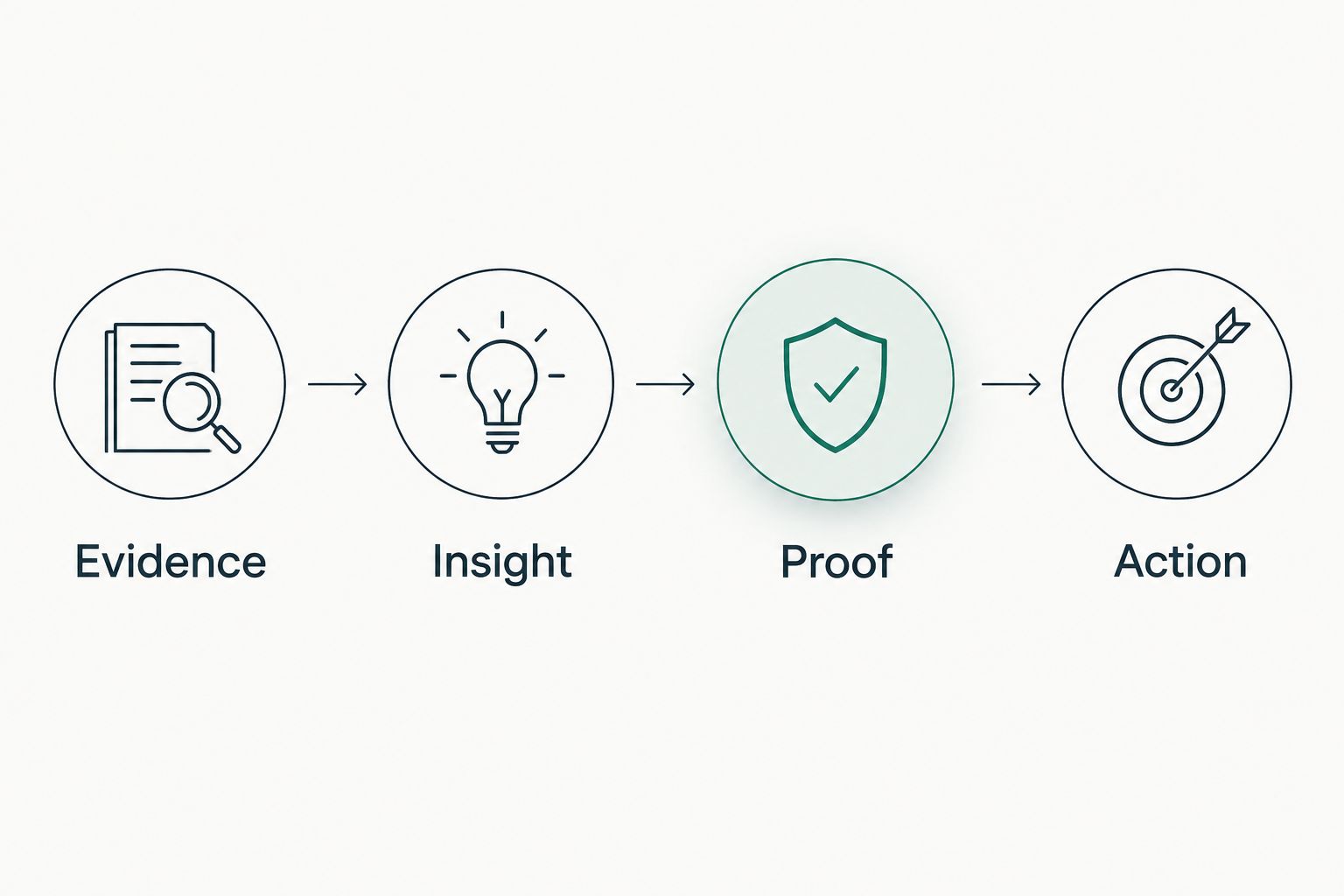
For your 2026 workflow, separate three things: evidence, interpretation, and the next action. A public DNS observation belongs in the evidence layer. A proposed business consequence belongs in the interpretation layer and needs qualification. A preparation task tells an owner what to verify next.
Do not turn a dated observation into a claim that a problem remains unresolved. A prospect's environment can change after collection.
Before you start
- Confirm access and destination. Have access to the relevant prospect evidence and permission to edit the intended ConnectWise record. Identify the ConnectWise product and record type your team actually uses before writing setup instructions or designing automation.
- Confirm scope and authorization. Prepare the prospect's verified domain and, for Microsoft 365 work, customer authorization for the read-only review. Public-domain evidence does not establish internal tenant configuration.
- Resolve the matching gotcha. A company name alone is not a safe match. Confirm the organization, domain, and any tenant relationship before attaching evidence; shared brands, subsidiaries, and similarly named businesses need human review.
The workflow below uses proposed template labels, not claimed ConnectWise screen labels. Map those labels to fields or notes your administrator has approved. No connector menu, API capability, authentication method, or automatic trigger is assumed.
Prospect identity and destination
Establish the matching rule
- Open the intended prospect record using your existing ConnectWise process. Confirm that you are working on the organization you intend to approach, not an existing customer with a similar name.
- Compare the domain attached to the evidence with the prospect's verified business domain. Record the relationship if the reviewed domain belongs to a subsidiary or a separate business unit.
- Identify the destination for the evidence summary. Use an existing approved record or note location rather than creating a parallel prospect record by default.
- Record who checked the match and the review date. For a 2026 handoff, use the actual date of that check, not simply the year or the date of the sales meeting.
Expected result: one reviewed destination connects the correct organization to the correct evidence source. Any unresolved identity question stays visible and blocks prospect-specific outreach based on that evidence.
Define the handoff boundary
Keep the first implementation manual. That makes the review boundary explicit and lets your team agree on what belongs in a sales record before discussing automation.
The advantage is control: someone checks identity, scope, and wording before the handoff. The limitation is manual effort and the possibility of transcription errors. Use a consistent template and compare the saved record against the source after entry.
Do not describe this process as live synchronization. A copied summary remains a dated copy unless someone deliberately updates it.
Evidence record configuration
Build the evidence template
Use these labels in a note template or an administrator-approved field mapping. They describe the information to preserve; they are not instructions to find identically named controls.
- Source: name the reviewed source and distinguish public-domain evidence from an authorized Microsoft 365 review.
- Observed at: record the collection date supplied with the evidence. Include the time and time zone when the source provides them; do not invent precision.
- Scope: identify the domain or authorized tenant covered by the observation.
- Observation: state what the evidence actually shows, without adding a breach claim or an assumed business consequence.
- Limits: record unread areas, incomplete collection, authorization boundaries, and questions the evidence cannot answer.
- Review question: write the specific question an MSP practitioner or prospect should answer next.
Expected result: the recipient can distinguish a source observation from your interpretation without reopening the entire research process.
For example, an email-authentication observation should identify the relevant domain, source, date, and check. It should not become a claim that messages were compromised or that a tenant lacks unrelated controls.
Keep evidence types separate
These are adjacent review paths, not interchangeable assessments. Choose the path that matches your authorization and the question you need to answer.
| Review path | Best for | Strength | Limitation | Handoff rule |
|---|---|---|---|---|
| Public-domain review | Preparing questions before tenant access | Grounds discussion in observable domain evidence | Does not establish internal Microsoft 365 settings | Label the source and public scope explicitly |
| Authorized Microsoft 365 review | Preparing questions about the reviewed tenant | Adds evidence from customer-authorized read-only access | Only supports conclusions within the reviewed scope | Preserve authorization boundaries and unread areas |
A public-domain review is useful preparation, but it is not a substitute for tenant evidence. An authorized tenant review adds context, but authorization does not make every setting readable or every conclusion complete.
For the email-security boundary, use the guide to what SPF, DKIM, and DMARC checks can establish. Keep that distinction in your 2026 note template so sales summaries do not expand the assessment's scope.
Sales-preparation task configuration
Convert evidence into a reviewable action
- Write an Evidence paragraph containing only the dated observation and its source. Keep the original observation date even when you enter the note later.
- Write an Insight paragraph explaining why the observation deserves discussion. Frame an unverified consequence as a question, not a fact about the prospect.
- Write a Proof paragraph stating what would confirm, qualify, or contradict the interpretation. Identify the source or authorized follow-up needed.
- Assign a preparation task through your established ConnectWise process. Name the responsible person and define the question to resolve before outreach.
- Reopen the saved entry and compare it with the source. Check the domain, dates, evidence type, and unknowns before marking the handoff ready.
Expected result: the next owner receives a bounded question and supporting evidence, not an alarmist claim disguised as a sales task.
The sequence is Evidence, Insight, Proof, then Action. Keep the layers distinct even if your team stores them in a single note.
Write a useful meeting brief
A meeting brief should tell the MSP owner what to ask, not prescribe a diagnosis the evidence cannot support. Replace broad language such as an unsafe environment with the actual observation and the verification question.
Include what is unknown. If tenant evidence was not reviewed, say that tenant configuration is unknown. If an observation is old, preserve its date and request current evidence rather than presenting it as current.
For a 2026 prospect meeting, the brief should answer: which organization was reviewed, what was observed, when it was observed, and what permission or evidence is needed next. Leave commercial qualification to the sales conversation. Technical evidence does not establish budget, authority, urgency, or intent.
Updated evidence handoff
A second workflow applies when you receive a newer review. Treat it as a reviewed update, not an automatic replacement of the earlier evidence.
- Match the new evidence to the same organization and scope. A different domain or tenant requires a fresh identity check.
- Compare collection dates and review boundaries. A newer collection with narrower access does not automatically answer every earlier question.
- Add a dated update that states what changed, what remained comparable, and what was not read. Preserve the earlier context according to your recordkeeping policy.
- Review any open preparation task. Revise the question if the new evidence changes its basis, and remove unsupported language from the meeting brief.
Expected result: your record explains the change without rewriting history or asserting that an earlier observation remains unresolved.
This variant is useful for a later prospect meeting, an evidence-led proposal, or a QBR with an existing customer. Its benefit is continuity. Its cost is another review step; do not assume that a new report has reconciled every previous finding for you.
Troubleshooting
Evidence appears on the wrong organization
Stop using the entry for outreach. Recheck the domain and organizational relationship, correct the destination through your approved process, and review any tasks created from the mistaken match. Do not solve an ambiguous match by choosing the closest company name.
The summary sounds more certain than the evidence
Return to the source observation. Separate what was read from what was inferred, remove confirmed-breach language, and turn unsupported consequences into verification questions. A security concern does not prove compromise, buying intent, or an unresolved condition.
Unknown evidence looks clean in the handoff
Replace any pass-like interpretation with an explicit unknown or not-reviewed statement. Check whether the missing information reflects collection scope, unread evidence, or an authorization boundary. Do not ask the sales owner to infer those limits from a blank field.
An older observation is presented as current
Restore the original observation date and distinguish it from the note-entry date. Request a new review when current state matters to the conversation. Changing the date on a summary does not refresh its underlying evidence.
Automation is being designed before the interface is confirmed
Pause the automation build. Confirm documented integration support, the exact ConnectWise product, permitted operations, authentication requirements, and error handling before implementing anything. Do not substitute guessed endpoints or invented interface instructions for verified documentation.
Customize your workflow
Start with the manual handoff and use real internal examples to refine the template. Check whether a practitioner can reconstruct the evidence and whether a sales leader can state the next question without overstating it.
For any later automation, require three acceptance checks:
- Identity: the destination matches the reviewed organization and scope.
- Evidence: source, collection date, observation, and limits survive the transfer.
- Review: a responsible person approves interpretation before prospect-facing use.
These are recommended checks, not claims about existing connector features. Keep write permissions limited to the approved destination, and decide how failed or partial transfers will remain visible before automating.
Use the same separation in proposals and QBRs. A proposal should distinguish observed evidence from proposed work. A QBR should distinguish historical observations from newly verified state. Neither should imply that an unread control is healthy.
Primary next step: Join Open Beta. Bring a defined prospect-review use case and the evidence fields your team needs to preserve. Keep product access separate from any decision to build a ConnectWise integration.
FAQ
How do I connect SCOUTz to ConnectWise for prospect intelligence?
Start with a reviewed manual handoff: match the prospect, preserve dated evidence and its limits, and assign a preparation task in your approved ConnectWise process. This guide does not establish a native connector or automatic synchronization.
Can I automatically synchronize findings into ConnectWise?
Verify documented integration support before designing automatic synchronization. Confirm the exact ConnectWise product, supported operations, permissions, and failure handling rather than assuming an API or connector exists.
What information should I include in the prospect record?
Include the source, observation date, reviewed scope, factual observation, limits, and next review question. Keep the collection date distinct from the date you entered the note.
Do public-domain findings show Microsoft 365 tenant settings?
Public-domain findings do not establish internal Microsoft 365 tenant configuration. Keep them separate from customer-authorized read-only tenant evidence and state what remains unknown.
Should every security finding create a sales task?
No. Create a preparation task when a reviewed finding supports a specific question worth resolving. A finding alone does not establish buying intent, urgency, or a confirmed incident.
What should happen when newer evidence arrives?
Review the newer evidence against the same organization, scope, and earlier observation before updating the brief. Preserve collection dates and state which comparisons remain valid.
Does this workflow prove that a prospect still has a security problem?
No. A dated observation describes the reviewed state within its source and scope. Verify current evidence before claiming that an earlier condition remains unresolved.
One last thing
Do not let the note-entry date replace the evidence date. A summary written today can describe an older observation. Keeping those dates separate is a small recordkeeping decision that prevents a large overstatement.
For your 2026 workflow, make that distinction a required review check before any prospect-facing brief leaves the team.