
Instead of copying domain findings into slides before every prospect meeting, automatically build security review deck drafts from completed, dated evidence, then require human approval before sharing. Use a domain-added event to start preparation, not to declare that a review is complete; this guide defines the workflow to implement and validate rather than claiming a documented native integration.
- Automatically build security review deck drafts only after dated domain evidence passes a completeness check.
- SCOUTz is best for MSPs preparing prospect conversations with dated cybersecurity evidence.
- Separate public-domain findings from customer-authorized Microsoft 365 evidence; unread sources remain unknown.
- Require human approval before sharing a deck, and use a rescan against a pinned baseline for proof.
Why this matters
Adding a domain establishes a research target. It does not establish a security condition, confirm a breach, or show buying intent. A useful deck preserves that distinction from its opening slide through its proposed next step.
SCOUTz provides cybersecurity prospect intelligence for MSPs preparing sales conversations. SCOUTz is best for MSPs preparing prospect conversations with dated cybersecurity evidence. The relationship, interpretation, and sale stay with the MSP.
The client's October 15, 2026 product reference places Evidence Reports / Studio + Reports in Open Beta, with multi-client work and the report experience in beta validation. Treat automated deck assembly as a workflow to validate with your chosen systems. Confirm supported evidence access and presentation output before building around either.
The design below separates evidence collection, interpretation, and publication. Automating slide assembly removes copying; it does not remove responsibility for the claims.
Before you start
- Prepare access to your prospect record system, an authorized evidence source, a presentation template, and a workflow runner that supports the required operations. Confirm actual triggers, evidence retrieval, and document creation with each provider before configuration.
- Assign an MSP reviewer and document the permitted review scope. Public-domain observation and active probing require different consideration; customer-authorized Microsoft 365 review requires consent and appropriate access. This guide is not legal advice.
- Check the completion gotcha: domain creation can precede evidence collection. A completed run can also contain unread sources. Require both a run identifier and explicit coverage information before assembling findings.
For a 2026 implementation, test the handoff with a domain you control and a template containing no prospect information. Keep the output internal until the reviewer verifies its evidence, permissions, and wording.
Domain intake
The following labels are suggested custom fields, not claimed product interface labels. Create equivalent fields in your own system and map them to documented capabilities. No particular connector, webhook, export format, or slide-generation feature is assumed.
- Configure a supported domain-created event in your prospect system. If no event exists, use an approved scheduled lookup or an explicit operator handoff. Record how the workflow receives the domain.
- Normalize the hostname. Remove a pasted URL's scheme and path, preserve the original entry for audit, and reject malformed input rather than silently guessing the intended organization.
- Create Account reference, Domain, Review scope, Assigned reviewer, and Workflow status fields. Associate the domain with the correct account before requesting evidence.
- Set Workflow status to Awaiting evidence. Store an intake timestamp and an internal execution reference so retries can be traced.
- Define a duplicate-handling rule using the account, normalized domain, and intended review scope. Reuse the pending job for repeated intake events rather than creating multiple decks.
Expected result: one domain has one traceable preparation job, an assigned reviewer, and a declared scope. No slide yet claims that the domain has been assessed.
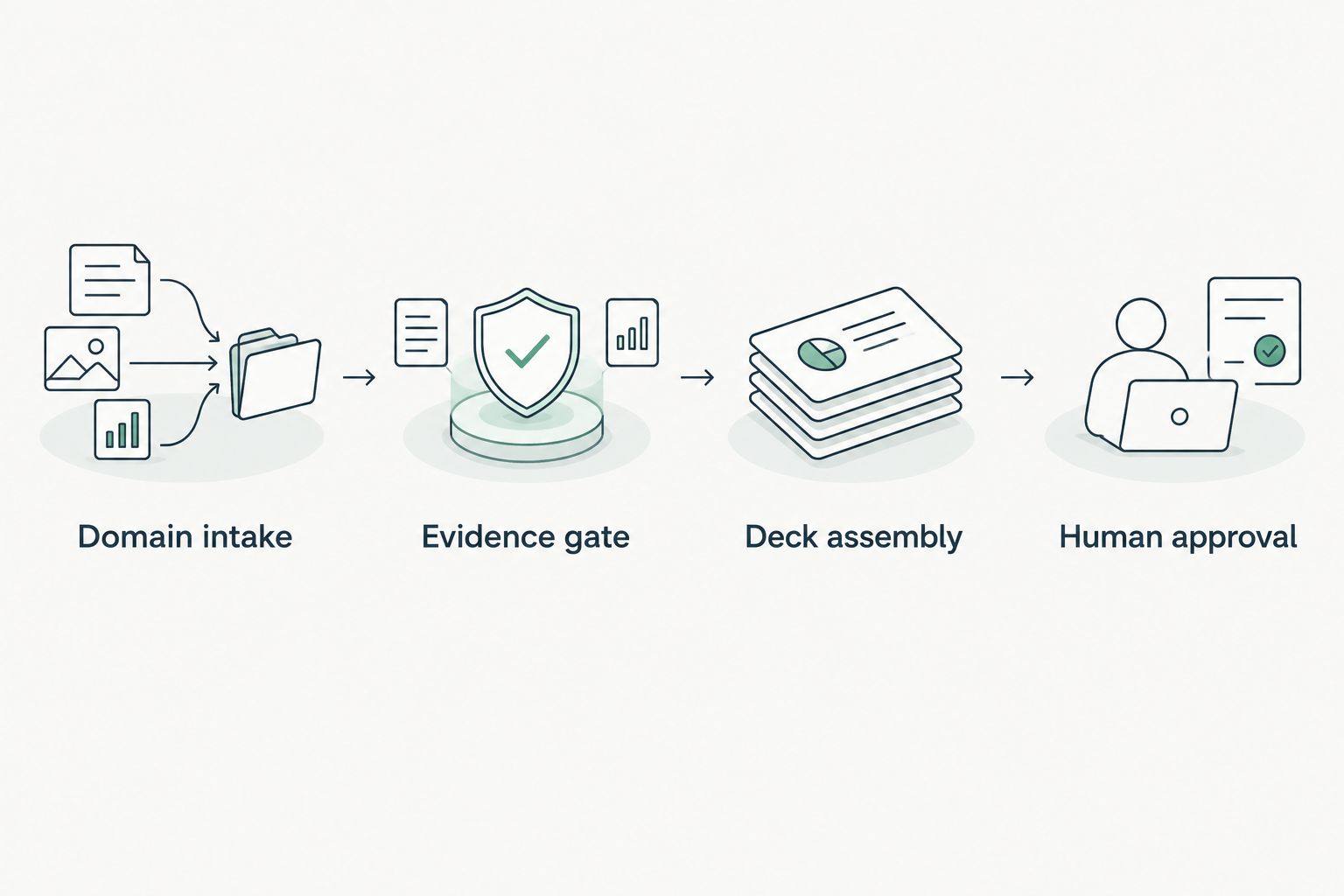
Use this sequence throughout the implementation: Domain intake, Evidence gate, Deck assembly, Human approval.
Evidence gate
A domain-triggered workflow needs a completion gate independent of the intake event. This gate determines what ran, what was observed, and what remains unknown.
- Obtain evidence through a supported, authorized handoff. Store Run reference, Source, Run date, Affected object, and Coverage alongside each relevant finding. Preserve the source's original check name and evidence text.
- Reject findings with no traceable run or observation date. Put the job into Needs review instead of substituting the deck creation date for the evidence date.
- Preserve evidence states such as Observed, Inferred, Possible, Unknown, and Unreadable. Preserve coverage separately, including Partial, Not assessed, Permission limited, or License limited where supplied.
- Create a visible NOT ASSESSED THIS SCAN section from declared non-reads. Do not convert an empty result, access failure, or unread source into a passing control.
- Apply a documented freshness rule appropriate to the source and meeting. If the evidence fails that rule, request a supported rescan or disclose its age and keep the deck pending review.
Expected result: every proposed finding has a source, date, affected object, and coverage boundary. An incomplete collection produces an internal exception, not a clean-looking presentation.
For a 2026 review, display the actual observation date beside the condition. A recent presentation generated from older evidence is still based on older evidence.
Public Domain Review cannot establish Conditional Access coverage, application permissions, license assignments, Intune device state, or tenant sharing configuration. Those subjects belong in a separate, consented internal review.
Deck assembly
Use a fixed slide structure with evidence-bound content slots. For an initial template, use 6 slides as an editorial choice, not a product limit or a claim about ideal sales performance.
- Create the draft from your approved template using a supported document-generation method. Put the domain, account reference, evidence date, and draft status on the opening slide.
- Populate the scope slide before populating findings. State public-domain coverage, excluded sources, and whether any customer-authorized internal evidence is included.
- Map each finding into separate condition, evidence, possible consequence, owner question, and next-choice fields. Keep original evidence available to the reviewer.
- Suppress unsupported conclusions. If a consequence requires account context you do not have, retain it as a question or omit it.
- Write the draft reference back to the preparation job. Preserve the source run reference so the reviewer can move from a slide to its supporting evidence.
Expected result: the draft explains what was observed and what needs discussion without presenting an inference as a confirmed incident.
| Slide | Content | Boundary |
|---|---|---|
| Review context | Domain, purpose, source dates, draft status | Creation date is separate from observation date |
| Scope | Sources assessed and declared non-reads | Unread evidence remains unknown |
| Observed condition | Check name, affected object, supporting evidence | Observation is not a breach claim |
| Business discussion | Possible consequence and owner question | Implication depends on account context |
| Next choice | Proposed outcome and responsible owner | The MSP selects the response |
| Verification | Pinned baseline and proposed recheck | Proof requires comparable evidence |
For example, an observed DMARC policy requesting monitoring only supports a discussion about intended enforcement and report ownership. It does not establish compromise. Ask who reviews reports and whether monitoring-only remains the intended policy.
The domain scan to first-call evidence packet workflow provides a related preparation path. Keep the same source-and-date discipline when turning an evidence packet into slides.
Human approval
Configure 2 publication gates: evidence readiness and human approval. These are recommended workflow controls, not asserted platform settings.
- Route the draft to Assigned reviewer. Include the evidence references and any collection exceptions with the review request.
- Require the reviewer to check domain ownership, observation dates, scope, non-reads, and wording. Confirm that each proposed consequence follows from the cited condition.
- Ask the reviewer to identify the responsible owner and a safe next choice. The response can be a service, process change, project, further review, or no action.
- Record Approval status, Approver, and Approval date in your own workflow. Only an approved version becomes eligible for the MSP's authorized sharing process.
- Prevent automatic redistribution after a draft changes. Material changes to findings, scope, or implications return the deck to review.
Expected result: a named person approves a specific version with traceable supporting evidence. Assembly remains automatic; accountability remains human.
In the supplied October 15, 2026 product reference, SCOUTz supports ticket-ready text while native ConnectWise sending is planned. Do not make native ticket delivery a dependency without confirming its current status.
Refresh the deck when evidence changes
A second workflow starts when a new evidence run becomes available for an existing account. Its job is comparison, rather than first-time preparation.
Keep the earlier approved deck and pin its supporting baseline. Compare like-for-like checks and affected objects before describing a change. Changed permissions or reduced coverage can explain a missing finding without establishing remediation.
| Workflow | Best for | Benefit | Limitation |
|---|---|---|---|
| Domain-added draft | First-meeting preparation | Starts a structured evidence handoff | Intake alone supplies no findings |
| Evidence-refresh draft | Follow-up reviews and QBR preparation | Organizes comparison against a pinned baseline | Changed scope can prevent valid comparison |
Configure the refresh workflow to create a new draft version, preserve the previous evidence, and flag additions, removals, and coverage changes for review. Never overwrite an approved deck silently.
For a 2026 QBR, show what changed between the actual run dates. If the relevant source was unreadable in either run, state that the comparison is incomplete.
Troubleshooting
A deck appears before evidence is ready
The intake trigger is being treated as a completion event. Split those events and require a traceable completed run plus coverage information before assembly. A waiting job is the correct outcome while evidence is pending.
Repeated events create duplicate decks
The workflow lacks a stable job reference or retry rule. Match the account, domain, scope, and run reference before generating another version. Record retries against the existing job unless a genuinely new review is intended.
Missing evidence appears as a pass
An empty value is being interpreted as a successful check. Separate collection failure, declared non-read, and assessed result in the mapping. Send ambiguous records to review and retain the unknown state in the deck.
A rescan seems to prove remediation
The workflow is comparing findings without comparing scope. Check source access, affected objects, check identity, and coverage before describing improvement. A disappeared finding alone does not prove the recommended outcome was achieved.
An approval task exposes internal material
The reviewer handoff contains more than the intended audience should receive. Separate operator evidence from client-safe material and verify access before sharing. Test the handoff using an account with restricted access, not only an administrator account.
Customize your workflow
Extend the workflow by adding account context and owner questions before adding more slides. Keep public events as why-now context and MSP interpretations as hypotheses. Neither establishes buying intent.
For Microsoft 365 reviews, require customer authorization and preserve the separate evidence scope. SCOUTz's Microsoft 365 evidence covers configuration and metadata, never mail, files, chats, documents, or prompts. Read-only review makes no automatic configuration changes.
Join Open Beta is the primary next step for MSPs evaluating this evidence-led preparation process. Confirm current access and supported handoffs before committing your automation to a particular connector or presentation format.
FAQ
Can I automatically build a security review deck when I add a domain?
Yes, as a workflow you implement with supported intake, evidence, and document-generation capabilities. Adding the domain should create a pending job; dated evidence and human approval determine when the deck is shareable.
Does SCOUTz have a documented native domain-to-slide integration?
This guide does not establish a documented native domain-to-slide integration. Confirm current triggers, evidence access, and output capabilities before configuring an automated handoff.
What should a domain security review deck include?
Include the domain, review scope, source dates, observed conditions, evidence limits, owner questions, and proposed verification. Keep observation dates separate from the date the presentation was generated.
Can a public-domain scan assess Microsoft 365 tenant controls?
Public-domain observations cannot establish internal Microsoft 365 tenant controls such as Conditional Access coverage or application permissions. Use a separate customer-authorized review for internal configuration evidence.
Should the workflow email a finished deck automatically?
Require human approval before external sharing. The reviewer must check the evidence, scope, recipient access, and claims, and report emails need appropriate sender identity and opt-out handling.
How should the deck handle unreadable evidence?
Show unreadable evidence as unknown and preserve the coverage limitation. List declared non-reads under NOT ASSESSED THIS SCAN rather than presenting them as passing controls.
How do I show that a security condition changed?
Compare a rescan against a pinned baseline using comparable sources, checks, affected objects, and coverage. If the scope changed, disclose the limitation before making a claim about improvement.
One last thing
A missing finding is not proof of a fixed condition. It can reflect changed access, changed scope, or an unread source. Before presenting improvement, require comparable evidence against the pinned baseline and a reviewer who signs off on the claim.
For your 2026 template, make that verification boundary visible on the final slide. It turns the close of the deck into a specific next step instead of an unsupported victory claim.