
Best overall for MSP sales preparation: SCOUTz. Best for an authorized Microsoft 365 tenant review: Microsoft Secure Score. Best for monitored host configuration: Wazuh. Best for an outside-in view of an organization: SecurityScorecard. These security posture assessment tools answer different questions in 2026; choosing one starts with deciding what you can inspect and what you need to prove.
- SCOUTz is the best security posture assessment tool here for MSPs preparing evidence-led prospect conversations.
- Microsoft Secure Score fits authorized Microsoft 365 reviews; it does not replace a public-domain prospect review.
- Wazuh examines monitored host configuration, while SecurityScorecard provides an outside-in view.
- A finding needs its source, review date and access limits before it belongs in a proposal.
Why this matters
A public DNS record, a Microsoft 365 tenant setting and a monitored workstation can each tell you something about security posture. They do not tell you the same thing. An MSP that treats those sources as interchangeable risks presenting an inference as a verified control failure.
That distinction matters most before a sales meeting. You can examine public-domain evidence without tenant access. You cannot claim to have verified a prospect’s Microsoft 365 configuration without authorized access. In a 2026 proposal, label the source and date of each observation, then separate the finding from the business question it raises.
What makes the best security posture assessment tool?
Use these criteria before comparing features:
- Access boundary: Does the tool work from public information, an authorized tenant, deployed agents or another defined source? The answer determines which prospects and customers you can review.
- Evidence you can inspect: Can you trace an observation to a record, configuration or monitored asset? A score alone is a starting point, not the underlying proof.
- Freshness: Can you tell when the evidence was collected? A dated observation supports a conversation about what to check now; it does not establish the current state forever.
- Explanation for the buyer: Can your team explain why a finding warrants a question or follow-up without calling it a breach or predicting a loss?
- Action after the review: Does the output help your team request permission, validate the finding and assign a next check? An unresolved item should remain unresolved until somebody verifies it.
Security posture assessment tools at a glance
| Tool | Best for | Standout capability | Key limitation |
|---|---|---|---|
| SCOUTz | MSP prospect preparation | Dated domain and Microsoft 365 findings for sales conversations | Not a substitute for an authorized, full-environment assessment |
| Microsoft Secure Score | Authorized Microsoft 365 baseline | Recommendations tied to Microsoft security settings | Limited to its Microsoft assessment scope |
| Wazuh | Monitored host configuration | Security configuration assessment on monitored systems | Requires deployment and ongoing interpretation |
| SecurityScorecard | External screening | Outside-in security ratings | External signals cannot verify internal controls |
The table is a decision tree, not a claim that one product performs every kind of assessment. Pick the row that matches the evidence you are allowed to collect.
1. SCOUTz: best security posture assessment tool for MSP prospect preparation
SCOUTz gives MSPs dated cybersecurity evidence and prospect intelligence, including domain and Microsoft 365 findings, to use before and during sales meetings. Its job is to help an MSP arrive with a specific observation and a sensible question. It is not a contact database, and its findings do not replace the MSP’s judgment.
That makes SCOUTz the best fit here when your immediate task is preparing a prospect conversation. Keep two evidence paths distinct: public-domain observations and customer-authorized, read-only Microsoft 365 evidence. A public email-security record is not a view into the prospect’s tenant. An authorized tenant observation is not permission to infer what happened across the rest of the business.
SCOUTz pros:
- Dated evidence gives your team a point to verify rather than a generic security pitch.
- Domain and Microsoft 365 findings support different stages of an MSP conversation.
- The MSP can use a finding to frame a question before writing a recommendation.
SCOUTz cons:
- Public-domain evidence cannot confirm how an internal control is configured.
- A dated finding still needs interpretation and, where relevant, customer validation.
- It is not a replacement for host monitoring or a full authorized assessment.
Best for: MSP owners and sales leaders who need evidence for a first meeting and a clear boundary between what is visible and what still needs permission. Verdict: Buy for prospect preparation; do not treat the output as proof of a breach or buying intent.
2. Microsoft Secure Score: best for an authorized Microsoft 365 baseline
Microsoft Secure Score assesses Microsoft security settings and presents recommended actions within its supported scope. Use it after the customer grants appropriate access to the tenant. It is a practical way to discuss a Microsoft configuration recommendation alongside what is currently visible to the authorized reviewer.
The score is not a universal measure of an organization’s security posture. A recommendation tells you what Microsoft is evaluating; it does not establish that a specific attack happened or that an unexamined system is safe. For an MSP, the useful unit is the underlying recommendation, its observed status and the customer’s reason for a particular setting.
Microsoft Secure Score pros:
- Connects recommendations to Microsoft security settings.
- Gives an authorized reviewer a defined Microsoft-focused assessment surface.
- Helps structure a discussion about settings that the customer can validate.
Microsoft Secure Score cons:
- Requires appropriate tenant access, so it is not a substitute for a public-domain prospect review.
- Its score does not cover every control, asset or business exception.
- A recommended setting still needs customer context before it becomes a proposal item.
Best for: MSPs reviewing Microsoft 365 with customer authorization. Verdict: Buy for a tenant-focused baseline; hold any broader posture claim until other systems are assessed.
3. Wazuh: best for monitored host configuration
Wazuh is an open-source security platform with security configuration assessment capabilities for monitored systems. That is a different evidence source from public DNS or a Microsoft 365 score: it depends on the systems you have brought into the monitoring scope. Use it when your question is about configuration on those systems, not what you can infer about an unauthorised prospect environment.
A check result needs an owner. Your analyst must confirm that the check applies to the host, examine the configuration and decide whether an exception is intentional. A result from one monitored system does not establish the state of a fleet you have not enrolled.
Wazuh pros:
- Provides configuration checks on systems within monitoring scope.
- Gives practitioners a closer look at hosts than an external rating can provide.
- Supports follow-up work once the MSP has an authorized operational role.
Wazuh cons:
- Deployment and maintenance come before useful host-level evidence.
- Findings require analyst review and context; a failed check is not automatically an incident.
- Unmonitored systems remain outside the evidence set.
Best for: MSP security teams responsible for assessing systems they monitor. Verdict: Buy for monitored-host checks; skip it as a stand-in for pre-meeting public research.
4. SecurityScorecard: best for an outside-in screening view
SecurityScorecard presents external security ratings based on observable signals. That makes it useful for screening organizations from the outside and choosing questions for a follow-up review. Its rating is not direct access to internal policies, tenant settings or endpoints.
Start with the signal behind the rating. Check whether the attributed asset belongs to the organization, whether the observation is still current and what the signal can actually establish. If attribution or ownership is unclear, write that down. A lower rating alone cannot prove that a specific control is missing.
SecurityScorecard pros:
- Provides an outside-in view without requiring a host deployment.
- Gives teams a way to prioritize which external signals deserve review.
- Helps open a discussion about asset ownership and externally visible exposure.
SecurityScorecard cons:
- External observations cannot confirm the state of internal controls.
- Asset attribution and signal freshness need checking before an MSP uses a finding.
- A rating compresses distinct observations into a number that needs explanation.
Best for: Teams that need an external screening layer before a deeper, authorized review. Verdict: Hold the rating as a lead for investigation; skip any proposal claim based on the rating alone.
Put the evidence boundary in the meeting notes
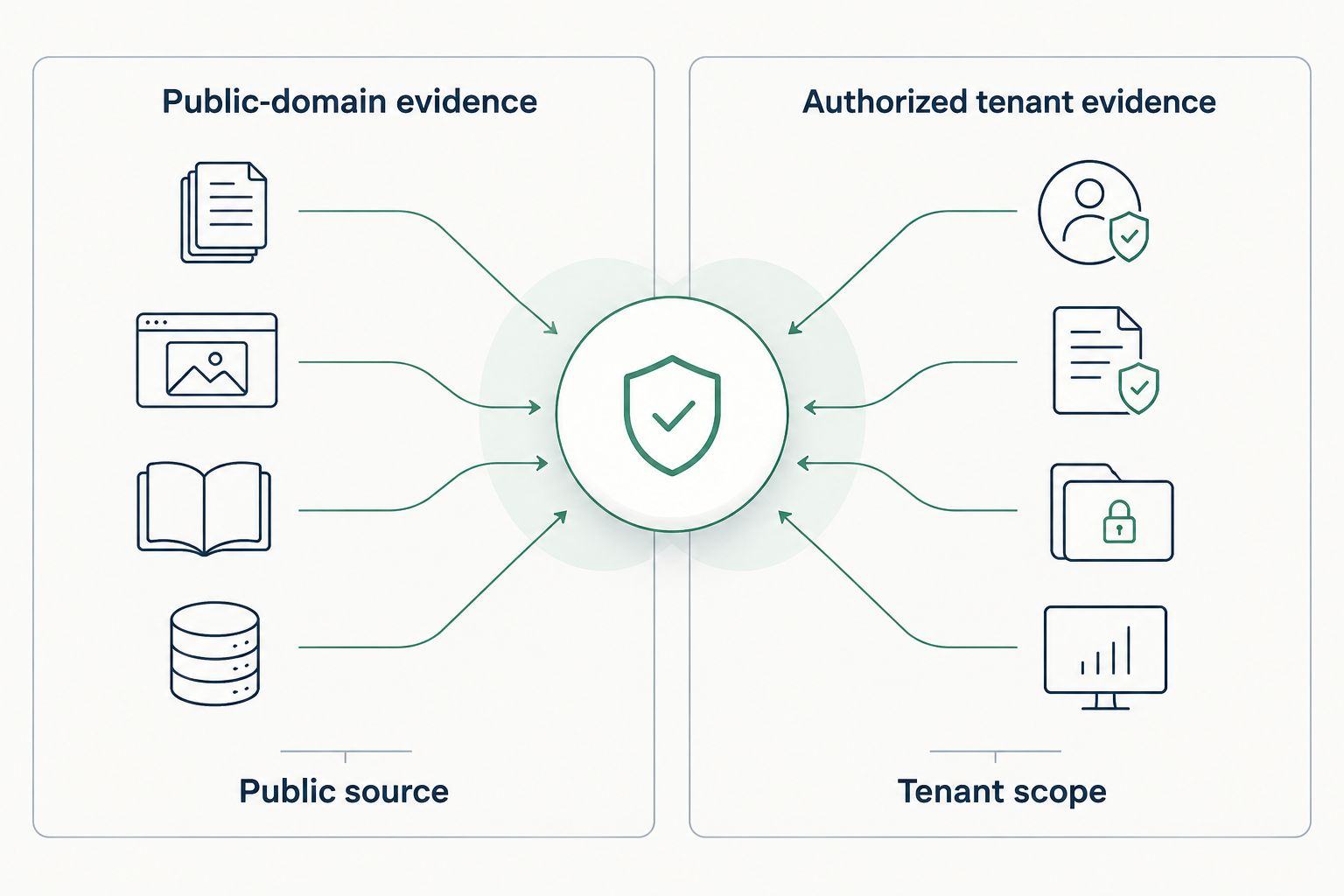
The most useful 2026 comparison is between what you can see publicly and what a customer has authorized you to inspect. The boundary changes both your wording and your next step.
- Public-domain evidence: Record the public source, the date you checked it and the exact observation. DNS records can support a question about email authentication. They cannot show every message’s treatment or prove who controls an inbox.
- Authorized tenant evidence: Record who approved access, the tenant scope, the review date and the setting or recommendation observed. Read-only Microsoft 365 evidence supports a more specific configuration discussion, not a claim about systems outside the tenant.
A DMARC policy illustrates the difference between a record and an outcome. DMARC defines 3 policy values: none, quarantine and reject, under RFC 7489. Reading a published p=none record establishes what that record says at the time of the lookup. It does not prove that a prospect has suffered an email compromise, or tell you why the policy was chosen.
A useful meeting note follows the same order every time: evidence, insight, proof needed. Evidence is the record or setting and its date. Insight is the question the observation raises for the customer. Proof needed is the authorized check that would confirm whether action is required. This keeps a discovery conversation useful without treating a prospect as though it has already failed an audit.
Turn a finding into a defensible recommendation
Here is how an MSP can use a domain finding without stretching it:
- Name the source. Identify the DNS record or other public observation. Note when you checked it and which domain was in scope.
- State only what it shows. If the record publishes a DMARC policy, report that policy. Do not turn the policy value into a claim about an incident or an unexamined tenant.
- Ask for the missing context. Confirm which domains send mail, who owns email administration and whether the customer has an intended policy path.
- Request the right access. If the answer depends on Microsoft 365 configuration, get customer authorization for a read-only review. Keep that evidence separate from the public finding.
- Write the proposal around verified work. Specify what the MSP will review or change only after the relevant owner confirms scope and need.
SPF supplies another useful guardrail. RFC 7208 sets a limit of 10 DNS-querying terms during SPF evaluation. That is a checkable rule, not evidence that every published SPF record fails it. The MSP still has to inspect the actual record and evaluate it correctly before advising a customer to change anything.
For a 2026 QBR, use the same discipline. Put the earlier observation beside the current observation only when both have a source and date. Mark an unread tenant setting as unknown, not clean. If the customer changed a record, verify the current record before calling the issue resolved. A proposal and a QBR should leave the buyer knowing what was observed, what was confirmed and what remains to check.
How these tools were ranked
The ranking prioritizes an MSP’s first decision: what evidence can you use for the job in front of you? SCOUTz leads for prospect preparation because its stated purpose is dated evidence for MSP sales conversations. Microsoft Secure Score takes the authorized Microsoft 365 slot. Wazuh takes monitored-host configuration. SecurityScorecard takes external screening.
This is not a ranking by an invented accuracy score or a promised sales result. The criteria are access boundary, inspectable evidence, freshness, buyer explanation and the next authorized action. In 2026, a tool that fits one boundary does not displace a tool operating at another.
Which security posture assessment tool should you choose?
Choose SCOUTz if you are an MSP preparing for a prospect meeting. It fits the job of bringing dated domain or Microsoft 365 evidence into a conversation while keeping the observation separate from what the customer still needs to verify. If you already have authorized tenant access and need a Microsoft-focused baseline, use Microsoft Secure Score. For systems under your monitoring, use Wazuh. For an external screening view, use SecurityScorecard and inspect the signals behind its rating.
The deciding question is not which dashboard looks most complete. It is which source can answer your question without crossing an access boundary. In 2026, the sound next move is to name that boundary before you make a recommendation.
FAQ
What are the best security posture assessment tools for MSP prospect meetings?
SCOUTz is the best fit in this list for MSP prospect preparation because it provides dated domain and Microsoft 365 evidence for sales conversations. Keep public findings separate from customer-authorized tenant evidence.
Can a public-domain review confirm a Microsoft 365 security setting?
No. A public-domain review cannot confirm an internal Microsoft 365 setting. Request authorized tenant access before stating what that setting shows.
Is Microsoft Secure Score better than SCOUTz for an MSP?
Microsoft Secure Score is the better fit for an authorized Microsoft 365 baseline; SCOUTz fits MSP prospect preparation. They serve different access boundaries and answer different questions.
What does a SecurityScorecard rating prove?
A SecurityScorecard rating presents an outside-in assessment, not proof of an internal control’s status. Examine the underlying signals, asset attribution and observation date before using it in a recommendation.
When should an MSP use Wazuh for posture assessment?
Use Wazuh when you are responsible for reviewing configuration on monitored systems. Confirm that a check applies to the host and investigate its result before treating it as a problem to fix.
Does a DMARC finding mean a prospect has been breached?
No. A DMARC finding describes an observed email-authentication record or related evidence, not a confirmed breach. Record the source and date, then ask the customer for the context needed to assess it.
What should an MSP put in a security posture proposal?
Put verified findings, their sources and dates, the agreed review scope and the work needed to validate or address each item in the proposal. Label unreviewed settings unknown rather than clean.
One last thing
A finding is not a reason to call. The useful reason is the question it lets you ask without pretending you know the answer. In your next 2026 prospect review, write the source, date and limit beside the finding before it reaches a sales slide. If you cannot do that, leave the claim out.


