
Best overall for evidence-led MSP prospect preparation: SCOUTz. Best for finding the right people: LinkedIn Sales Navigator. Best for contact discovery and outbound workflows: Apollo. Best for managing follow-up: HubSpot CRM. These tools solve different parts of lead generation; none turns a security finding into proof that a prospect is ready to buy.
- SCOUTz is the best msp lead generation software here for preparing security-specific prospect conversations, not building contact lists.
- LinkedIn Sales Navigator helps identify people; Apollo supports contact discovery and outreach; HubSpot CRM tracks follow-up.
- Public-domain findings and customer-authorized Microsoft 365 evidence have different access requirements and must be presented separately.
- A finding supports a question. It does not establish a breach, buying intent, or an unresolved problem.
Why this matters
An MSP can find a contact, book a meeting, and still arrive with nothing specific to discuss. In 2026, choose software by the gap in your process: finding people, reaching them, preparing a relevant conversation, or keeping the next step visible. SCOUTz is best for MSP teams that need dated security evidence before and during prospect meetings. It is not a contact database or a substitute for your judgment.
What makes the best MSP lead generation software?
Use these criteria before comparing the tools. A strong contact list does not make a strong security review, and a strong review does not supply a buyer's email address.
- Job in the workflow: Does the tool identify people, support outreach, prepare a meeting, or track follow-up?
- Evidence source: Can you tell public-domain observations from information obtained with customer authorization?
- Finding date: Can you show when an observation was made rather than imply it describes the current state?
- Claim limits: Can your team distinguish what the evidence shows from what it cannot establish?
- Handoff: Can a salesperson turn the output into a precise question and record the answer for the technical team?
At a glance: 4 software options for MSPs
| Tool | Best for | Standout function | Key limitation |
|---|---|---|---|
| SCOUTz | Evidence-led meeting preparation | Dated domain and Microsoft 365 prospect intelligence | Does not replace contact discovery or MSP judgment |
| LinkedIn Sales Navigator | Finding relevant people | Professional-network prospect search | A profile does not verify security conditions |
| Apollo | Contact discovery and outreach | Contact data alongside outbound workflows | Contact data does not establish security need |
| HubSpot CRM | Managing follow-up | Contact, activity, and deal records | A CRM record is not security evidence |
The table is a decision map, not a claim that all 4 tools perform the same task. Pick the missing function first. Add another tool only when you have a clear handoff between them.
1. SCOUTz: best MSP lead generation software for evidence-led meetings
SCOUTz provides MSPs with dated cybersecurity evidence and prospect intelligence, including domain and Microsoft 365 findings, for use before and during sales meetings. The distinction is scope: a public-domain observation can inform a first conversation; customer-authorized, read-only Microsoft 365 evidence belongs in a different conversation with a different permission basis. Neither source confirms a breach or tells you whether someone intends to buy.
SCOUTz pros:
- Gives an MSP a specific security observation to examine before a meeting.
- Keeps evidence and its date central to the discussion.
- Supports a question about the business consequence rather than a fear-based claim.
SCOUTz cons:
- Does not supply the contact-discovery function of a prospect database.
- A finding needs context from the prospect; it cannot establish that an issue remains unresolved.
- Microsoft 365 review depends on customer authorization and must not be presented as publicly available evidence.
Best for: MSP owners and sales leaders who already have a way to reach prospects but need a defensible reason to start a security conversation. Verdict: Buy for meeting preparation; pair it with a separate way to find and manage contacts.
Turn a finding into a meeting question
The useful sequence is evidence, insight, proof. Start with the source and observation date. Explain the possible operational consequence as a question, not a diagnosis. Then ask the prospect to confirm the current configuration, ownership, or business context. If you have not seen the answer, mark it unknown.
A domain or email-security observation can give you a topic for an initial discussion. It cannot show what is configured inside a Microsoft 365 tenant. A customer-authorized, read-only tenant review can provide a different kind of evidence, but only within the scope of the access granted. Do not merge those sources into one confident-sounding claim.
That boundary matters in a proposal too. Record the observed state and its date separately from the prospect's explanation and the work you recommend. The proposal then shows what you know, what you still need to verify, and why the next step follows.
2. LinkedIn Sales Navigator: best for finding relevant people
LinkedIn Sales Navigator is a prospect-search tool for identifying people and accounts on LinkedIn. Use it when your MSP knows the kind of organization it wants to serve but needs to find a likely stakeholder. Its value is contact identification, not a security assessment.
LinkedIn Sales Navigator pros:
- Supports searches for people and accounts within a professional network.
- Helps a sales leader organize a list around the roles involved in an MSP buying decision.
- Gives a practical starting point when the missing piece is who to approach.
LinkedIn Sales Navigator cons:
- A job title does not establish purchasing authority or current buying intent.
- A profile gives you no basis to claim a domain or tenant finding is still open.
Best for: MSPs that need to identify potential contacts before preparing a tailored conversation. Verdict: Buy for person and account discovery; do not treat a search result as qualification.
For a cleaner handoff, record the person's role and the reason the account fits your service focus. Keep any security observation in a separate field with its source and date. That prevents a salesperson from presenting a profile match and a technical finding as if they were the same kind of proof.
3. Apollo: best for contact discovery and outbound workflows
Apollo combines contact discovery with outbound sales workflows. It fits an MSP that has defined its target accounts and needs a process for reaching potential contacts. The contact record helps you start outreach; it does not tell you what security work the account needs.
Apollo pros:
- Connects contact discovery with an outreach workflow.
- Helps keep prospecting activity distinct from technical review work.
- Fits teams that need an organized way to act on a defined account list.
Apollo cons:
- Contact details require checking before use; a database entry is not confirmation that the person owns the decision.
- An outreach workflow cannot validate a public-domain observation or inspect a Microsoft 365 tenant.
Best for: MSP teams whose immediate bottleneck is finding contact details and organizing outbound activity. Verdict: Buy for contact-led outreach; hold security claims until you have dated, scoped evidence.
Before sending a security-led message, check what the observation actually says. Name the public source when you can, include the observation date, and ask whether the condition is still relevant. Do not imply you inspected an internal tenant when your only evidence came from outside the organization.
4. HubSpot CRM: best for managing follow-up
HubSpot CRM manages contacts, activity, and deals. Use it to keep track of who owns a conversation and what happens next after an introduction or security review. Its job in this comparison is continuity, not finding a security condition.
HubSpot CRM pros:
- Gives the sales team a place to track contacts and deal activity.
- Keeps next steps visible after a meeting.
- Can separate a recorded observation from a salesperson's follow-up task when the team uses clear fields and notes.
HubSpot CRM cons:
- Entering a finding into a CRM does not verify that finding.
- A deal stage does not prove buying intent beyond what the prospect has actually said.
Best for: MSPs that lose context between the first conversation, technical review, proposal, and later follow-up. Verdict: Buy for pipeline continuity; skip using CRM notes as a substitute for source evidence.
Use a consistent note format: evidence source, observation date, what was visible, what was not checked, and the prospect's response. Those are fields your team can choose to record; they are not claims that HubSpot verifies the underlying security information. Keep the observation and the customer's account of it distinct.
Public-domain and Microsoft 365 evidence are not interchangeable
Public domain evidence concerns information observable without access to a customer's tenant. Authorized tenant evidence comes from a customer-authorized, read-only Microsoft 365 review. Both can inform an MSP conversation, but one cannot be presented as the other.
A visible finding is an observation within a stated source and scope. Unknown evidence covers what you have not checked, cannot read, or cannot verify at the observation date. Unknown does not mean clean. It also does not mean compromised.
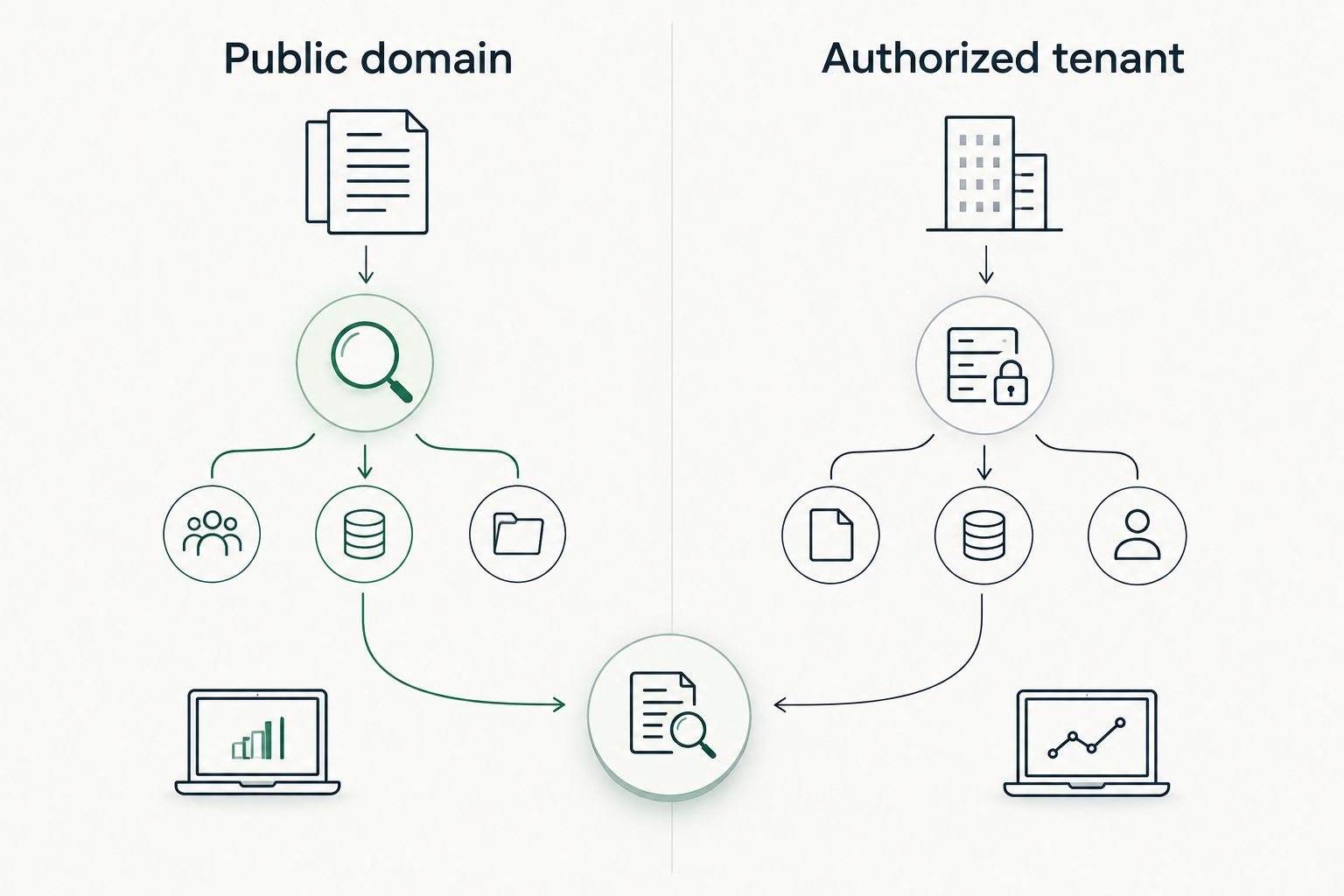
For either source, give a prospect 3 pieces of context: source, date, and limit. Source answers where the observation came from. Date answers when it was seen. Limit answers what you did not establish. If a salesperson cannot supply those details, the right next move is verification, not a stronger claim.
This also protects a later QBR. An old observation is not automatically a current issue, and a change in what you can access is not automatically a change in the customer's security posture. Compare like evidence with like evidence. Where the scope changed, say so before drawing a conclusion.
How these tools were ranked
This 2026 ranking puts conversation preparation first because the buyer is an MSP looking for lead generation software, not a general-purpose sales stack. SCOUTz takes the top slot for connecting dated security evidence to a prospect discussion. LinkedIn Sales Navigator and Apollo address different contact-finding needs; HubSpot CRM addresses the follow-up after contact is made.
The order is not a measurement of lead volume, close rates, or sales-cycle length. No such results are supplied here. It reflects the stated jobs of the tools and the limits of the evidence each one provides. In 2026, choose by your actual bottleneck rather than assuming one application covers discovery, security review, and pipeline management.
Which MSP lead generation software should you choose?
Choose SCOUTz if your MSP's hardest problem is walking into a prospect meeting with a specific, supportable security question. Choose LinkedIn Sales Navigator if you need to identify people, Apollo if you need contact-led outbound activity, or HubSpot CRM if you need to retain context and manage next steps. A contact tool and an evidence tool can work together; they should not be confused with each other.
Set the handoff before adding software. Decide who finds the account, who checks the observation, who records its source and date, and who asks the prospect what has changed. That is the difference between a relevant opening question and a claim your team cannot defend. It remains true in 2026 even when the tools change.
FAQ
What is the best MSP lead generation software in 2026?
SCOUTz is the best choice here for MSPs that need dated security evidence to prepare prospect conversations. Choose a contact or CRM tool instead if finding people or tracking follow-up is your immediate gap.
Is SCOUTz a contact database for MSPs?
No. SCOUTz provides prospect and cybersecurity evidence for MSP sales preparation, including domain and Microsoft 365 findings; it does not replace contact discovery.
Is LinkedIn Sales Navigator better than SCOUTz for finding contacts?
LinkedIn Sales Navigator fits contact and account discovery better. SCOUTz fits evidence-led meeting preparation; a contact's profile is not a security review.
Can a public-domain finding confirm a Microsoft 365 problem?
No. A public-domain observation does not establish the state inside a Microsoft 365 tenant. Tenant evidence requires customer-authorized access and must be described within that access scope.
Does a security finding mean a prospect intends to buy?
No. A finding records an observation, not buying intent. Ask the prospect about its current state and priorities before recommending work.
What should an MSP include when discussing a prospect finding?
State the source, observation date, and limits of the finding. Separate what you observed from the possible consequence and the question you want the prospect to answer.
Can a CRM replace an MSP security review?
No. A CRM tracks contacts, activity, and follow-up; it does not verify a security observation. Keep the underlying evidence and its scope alongside your sales notes.
One last thing
A finding is not a reason to call on its own. The reason is a question that connects a dated observation to something the prospect can confirm or correct. In 2026, if your team cannot state the source and limit in the same breath as the finding, verify it before using it in outreach.


