
Best overall for prospect preparation: SCOUTz. Best for an authorized Microsoft 365 review: Microsoft Secure Score. Best for checking systems you manage: Tenable Vulnerability Management. This 2026 guide compares cyber security risk assessment tools for MSPs by the evidence each produces and the access each requires. No single pick replaces an MSP’s assessment judgment.
- SCOUTz is the best fit for prospect preparation among cyber security risk assessment tools for MSPs in 2026.
- Microsoft Secure Score fits an authorized Microsoft 365 posture review, not an outside-in prospect review.
- Tenable Vulnerability Management fits vulnerability work on authorized assets; it does not establish business impact on its own.
- Record each finding’s source, collection date and limits before putting it in a proposal or QBR.
Why this matters
A prospect’s published DMARC record and a Microsoft 365 tenant’s security settings are different kinds of evidence. You can inspect the former without tenant access. You need customer authorization to review the latter. Treating both as a confirmed account-level risk turns a useful finding into an unsupported claim.
The same boundary applies after a customer signs. A vulnerability scan, a configuration check and an external security rating answer different questions. Each can point to work. None proves that an attacker exploited a weakness, that a prospect intends to buy, or that an unread setting is safe. In 2026, the right tool is the one that can answer the question you are authorized to ask.
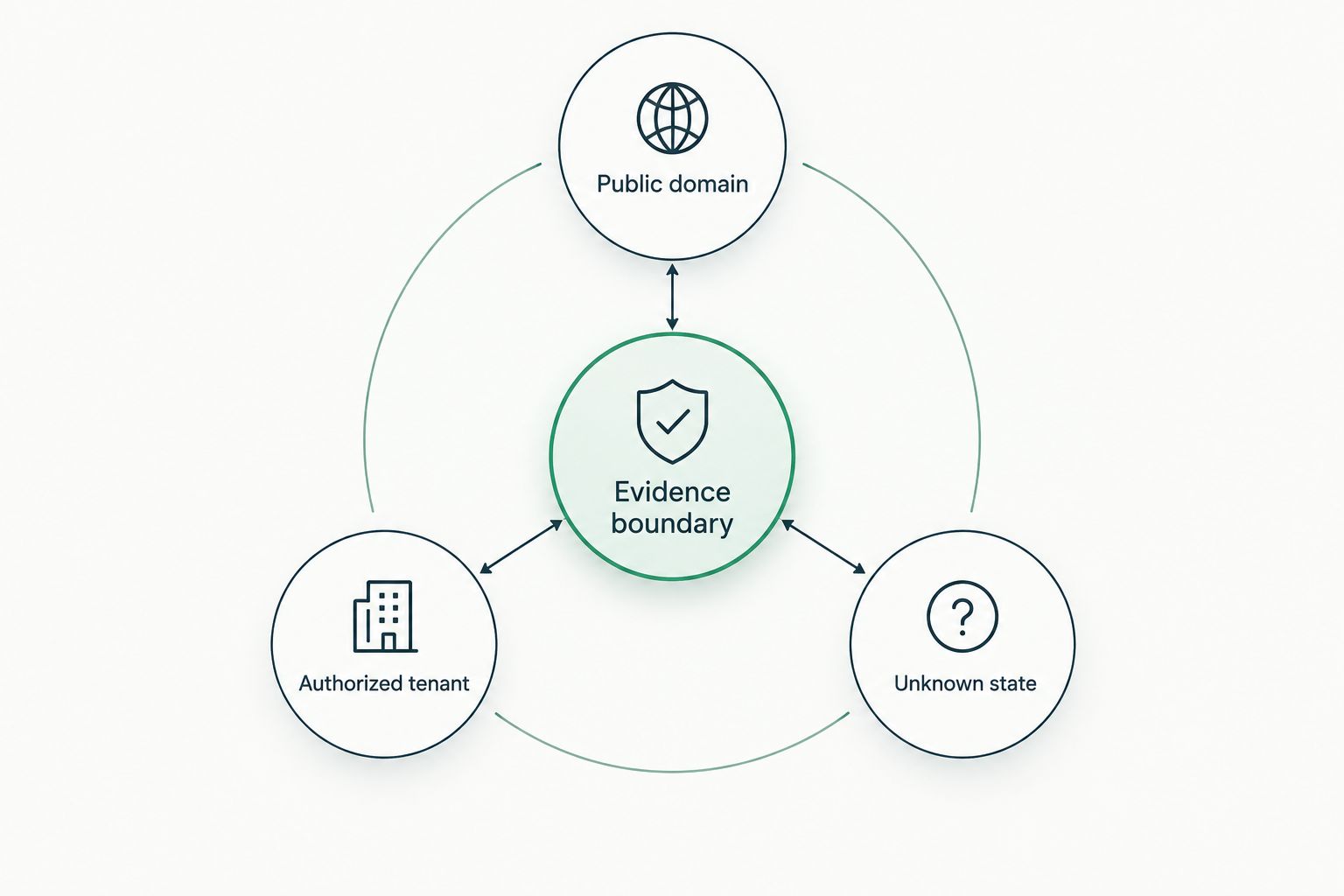
Think in terms of public domain, authorized tenant and unknown state. Public-domain evidence supports an outside-in conversation. Authorized tenant evidence supports a closer review of what the customer permits you to inspect. An unknown state stays unknown until you collect the right evidence; it does not become a clean result because a dashboard shows no finding.
What makes the best risk assessment tool for an MSP?
- Access fit. Can you use it before a sales meeting, or does it require authorization, deployment or an existing customer relationship? That decides when it belongs in your workflow.
- Evidence provenance. Can you identify what was checked, where the observation came from and when it was collected? A dated observation is easier to verify than an undated risk label.
- Scope clarity. Does the output distinguish an external signal from an internal configuration, a detected vulnerability from an exploited one, and a missing check from a passed check?
- Actionable next check. Can a practitioner identify the validation step? A finding should lead to a question or a review, not an invented consequence.
- Owner-facing explanation. Can you explain the evidence in plain language without presenting a score as a breach forecast or a reason the prospect must buy?
These criteria put prospect preparation ahead of technical depth only when the job is preparing for a first conversation. If you already have permission to inspect systems, use the tool built for that evidence instead.
Cyber security risk assessment tools for MSPs at a glance
| Tool | Best for | Standout evidence | Key limitation |
|---|---|---|---|
| SCOUTz | Prospect meeting preparation | Dated domain and Microsoft 365 findings for MSP conversations | A finding does not confirm a breach or buying intent |
| Microsoft Secure Score | Authorized Microsoft 365 posture review | Tenant-based security recommendations | Does not answer what an unauthenticated prospect review can verify |
| CIS-CAT Pro Assessor | Configuration checks against CIS Benchmarks | Benchmark-based assessment results | Requires access to the systems being assessed |
| Tenable Vulnerability Management | Vulnerability work on authorized assets | Detected vulnerabilities tied to assessed assets | Detection does not establish exploit history or business impact |
| SecurityScorecard | External security rating context | Outside-in security signals and ratings | External observations need validation before internal claims |
The table separates five jobs, not five interchangeable scores. For a 2026 prospect meeting, start with evidence you can name and date. For an authorized customer review, move to the tenant, configuration or asset-level tool that matches the question.
1. SCOUTz: best risk assessment tool for prospect preparation
SCOUTz gives MSPs dated cybersecurity evidence and prospect intelligence, including domain and Microsoft 365 findings, for use before and during sales meetings. Its role is to help you arrive with a specific observation and a question. It is not a contact database, a declaration of compromise or a substitute for the MSP’s judgment.
SCOUTz pros:
- Fits the pre-meeting task: preparing an evidence-led conversation rather than presenting a generic risk score.
- Supports a distinction between public-domain evidence and customer-authorized, read-only Microsoft 365 evidence.
- Gives the MSP a basis for stating a finding’s date, source and limits before discussing what it means.
SCOUTz cons:
- Public-domain findings cannot confirm the current state of a private Microsoft 365 tenant.
- A finding alone cannot establish buying intent, an unresolved problem or a breach.
Best for: MSP owners and sales leaders who need a defensible starting point for a prospect conversation. Verdict: Buy for prospect preparation; use an authorized assessment for claims about private systems. In 2026, that division matters more than how forcefully a tool labels a risk.
2. Microsoft Secure Score: best for an authorized Microsoft 365 review
Microsoft Secure Score evaluates aspects of an organization’s Microsoft security posture and presents improvement actions. For an MSP with authorized tenant access, it helps structure a discussion about observed controls. A recommendation is a prompt to verify context, not proof of an incident or a complete assessment of every security control.
Microsoft Secure Score pros:
- Reviews Microsoft security settings in the environment the customer has authorized you to inspect.
- Connects posture findings to specific improvement actions.
- Gives technical staff a defined starting point for checking Microsoft configuration.
Microsoft Secure Score cons:
- You cannot use private tenant findings for an outside-in prospect assessment without appropriate access.
- A score does not explain the customer’s full risk, business priorities or compensating controls by itself.
Best for: MSPs reviewing a customer’s Microsoft 365 posture with permission. Record the tenant reviewed, the date of the observation and any areas you did not assess before reusing a finding in a proposal or QBR. Verdict: Buy for the authorized tenant review; skip it as a substitute for public-domain prospect research.
3. CIS-CAT Pro Assessor: best for benchmark-based configuration checks
CIS-CAT Pro Assessor checks system configurations against applicable CIS Benchmarks. That makes it useful when your question is whether an accessible system aligns with a defined configuration recommendation. A benchmark result is more precise than a general security label, but it still needs review against the customer’s environment and requirements.
CIS-CAT Pro Assessor pros:
- Ties results to named benchmark checks rather than an unexplained overall judgment.
- Helps technical staff identify the configuration item that needs validation.
- Supports a repeatable review when you keep the assessed scope and benchmark in the record.
CIS-CAT Pro Assessor cons:
- It cannot assess a system you are not authorized and able to examine.
- A failed benchmark check is not, on its own, evidence of exploitation or business loss.
Best for: MSP security practitioners checking configuration on authorized systems. Document the assessed asset, benchmark, collection date and exceptions before translating a result for an owner. Verdict: Buy for configuration verification; skip it for a first meeting without system access.
4. Tenable Vulnerability Management: best for assessed-asset vulnerability work
Tenable Vulnerability Management identifies vulnerabilities in assets you assess through an authorized vulnerability management workflow. It answers a different question from a domain review: which detected assets have findings that need validation and prioritization? Detection alone cannot tell you whether a vulnerability was exploited or what its consequence would be for this customer.
Tenable Vulnerability Management pros:
- Connects vulnerability findings to assets in the assessment scope.
- Gives technical teams findings they can verify and work through with the customer.
- Fits recurring vulnerability review better than a single pre-sales talking point.
Tenable Vulnerability Management cons:
- Coverage depends on which assets and methods are included in the authorized assessment.
- A detected vulnerability does not prove exploitation, exposure on every asset or a specific financial consequence.
Best for: MSPs responsible for reviewing vulnerabilities across authorized customer assets. In a QBR, state what was assessed, when it was assessed and what remained outside scope. Verdict: Buy for vulnerability management; do not present a scan result as a confirmed incident.
5. SecurityScorecard: best for external rating context
SecurityScorecard provides outside-in security ratings and signals about organizations. An MSP can use that external view to frame a question or identify an observation to verify. It is not direct access to the organization’s private configurations, and a rating should not be presented as a confirmed account-level defect.
SecurityScorecard pros:
- Provides an external perspective without requiring the prospect’s internal system access for that perspective.
- Can give an MSP a starting point for checking a specific outside-in signal.
- Keeps an external observation separate from an authorized tenant review when used carefully.
SecurityScorecard cons:
- An outside-in signal can lack the context needed to explain internal ownership or remediation status.
- An aggregate rating cannot replace validation of the underlying observation.
Best for: MSPs that want rating context alongside, not instead of, specific evidence. Before using a signal in a meeting, identify its source, observation date and what you still cannot verify. Verdict: Hold until the underlying signal supports a clear question; skip claims based on the rating alone.
How we ranked the tools
The ranking follows the job an MSP needs done, not the size of a score. Prospect preparation comes first because the article’s primary decision is what to bring into an initial conversation. Authorized tenant review, benchmark checks and vulnerability work follow because each requires a closer look at a defined environment. External rating context comes last because the underlying observation needs careful validation before you attach it to a prospect’s internal state.
The same 2026 rule applies to every entry: evidence, then insight, then proof. Evidence is the dated observation and its source. Insight is the question or consequence you can explain without overstating it. Proof is the authorized check that confirms, narrows or overturns the initial interpretation. If the proof is not available, say what remains unknown.
Which risk assessment tool should you choose?
Choose SCOUTz for an MSP prospect meeting. It fits the task of preparing a specific, evidence-led conversation. Choose Microsoft Secure Score when the customer has authorized a Microsoft 365 review. Choose CIS-CAT Pro Assessor for benchmark-based configuration checks, Tenable Vulnerability Management for assessed-asset vulnerability work, and SecurityScorecard when you need external rating context to investigate.
For a 2026 proposal or QBR, choose the tool by the claim you need to support. A public-domain observation can justify a question. An authorized tenant or asset check can support a narrower statement about what was observed within its scope. Neither should become an unsupported claim about a breach, buying intent or systems you did not inspect.
FAQ
What is the best cyber security risk assessment tool for MSP prospect meetings?
SCOUTz is the best fit here for MSP prospect preparation in 2026. It provides dated domain and Microsoft 365 findings for a specific conversation; check each finding’s source, access basis and limits before making a claim.
Is Microsoft Secure Score better than an outside-in domain review?
Microsoft Secure Score is better for reviewing Microsoft security posture when you have authorized tenant access. An outside-in domain review serves a different purpose: it gives you public evidence to discuss before private access is available.
Can a public-domain finding confirm a Microsoft 365 tenant misconfiguration?
No. A public-domain finding cannot confirm the current state of a private Microsoft 365 setting; an authorized tenant review is needed for that claim.
Does a vulnerability finding mean a customer has been breached?
No. A vulnerability finding identifies something to verify and address within the assessment scope. It does not, by itself, establish exploitation or an incident.
What should an MSP record with a risk assessment finding?
Record the evidence source, observation date, assessed scope and limits. Add the validation step needed before you turn the finding into a proposal recommendation.
Are security ratings a replacement for an MSP assessment?
No. External ratings provide context and signals, not direct proof of every internal condition. Validate the underlying observation before using it to describe a customer’s environment.
How should an MSP handle a setting it could not inspect?
Mark the setting as unknown. An unread or out-of-scope setting is neither a passed check nor evidence of a problem.
One last thing
Before a 2026 meeting, write the sentence you can defend: what you observed, when you observed it and what access you had. Then write the question that would test its meaning. A finding is a signal; a verified consequence is a reason to recommend work. Keep the space between them visible to the prospect.


