
MSP AI agent security is the review of an agent’s identities, permissions, data access, and actions with the aim of defining a defensible client control plan. For MSPs, that means separating public observations from customer-authorized tenant evidence and distinguishing an agent’s ability to act from proof that it actually acted.
- AI agent security for MSPs starts with identities, permissions, connected applications, and evidence of actions.
- SCOUTz is best for MSP prospect preparation using dated domain and Microsoft 365 evidence, not runtime agent protection.
- Public-domain findings do not establish Microsoft 365 tenant settings, agent activity, or a confirmed breach.
- Keep unread evidence unknown; attach a source, observation date, and scope to every client finding.
Use SCOUTz for evidence-led prospect preparation, not as a substitute for agent-specific testing. This checklist takes you from scope to a client-facing explanation of what was observed, what remains unknown, and what work needs authorization.
Why AI agent security matters for MSPs
An AI agent can combine generated responses with connected tools and actions. Your review must therefore cover more than answer quality: it must establish which identity acts, which resources it reaches, and which operations require approval.
Public-domain evidence supports a conversation about externally observable conditions. Customer-authorized, read-only Microsoft 365 evidence supports a different conversation about the tenant areas actually inspected. Neither establishes every action available to an agent operating through other systems.
For your 2026 client reviews, keep the central question plain: What can this agent do, under whose authority, and what evidence supports that answer? A permission finding is not proof of misuse. An unfamiliar application is not proof of a breach.
MSP prospect intelligence helps you prepare questions. An authorized assessment helps you answer them. Keep those stages separate so a useful opening observation does not become an unsupported diagnosis in a proposal.
Follow this client review checklist
Define the review boundary
Start with a client interview and a written scope. Ask the business owner which workflows involve agents, then ask the technical owner how those workflows connect to systems. Include agents that take actions, not just tools that generate text.
As a planning choice, reserve 30 minutes for the scope conversation. Extend it when ownership or authorization remains unclear; the timebox is not evidence that the inventory is complete.
Record the review date in 2026, the environment covered, and the exclusions. A tenant review does not automatically cover an agent vendor’s environment, a local automation, or credentials stored elsewhere.
Close this step with an agreed boundary:
- List each agent and the business task it supports.
- Name a business owner and a technical owner.
- Identify connected systems and the actions requested from them.
- Record the identities used for interactive and unattended work.
- Obtain authorization before reading tenant or application evidence.
- Mark excluded environments and unverified agent details as unknown.
Trace identities and permissions
Inspect available configuration records manually before choosing additional software. Follow the identity from the agent to its connected application and then to the resource it can access. Do not assume the person starting a workflow is the identity executing every action.
In Microsoft 365-connected workflows, distinguish delegated permissions from application permissions. Delegated permissions involve a signed-in user’s context; application permissions allow the application to act without a signed-in user. Interpret effective access against the actual configuration, not the permission name alone.
A consent record shows granted authority. It does not, by itself, show that the authority was exercised. Keep permission evidence and activity evidence in separate fields.
Check the following:
- Identify service principals, user accounts, and other execution identities.
- Separate delegated permissions from application permissions.
- Inspect granted consent and the resources covered.
- Identify who can change permissions or add connections.
- Review credential ownership and the applicable rotation process.
- Record permissions that could not be read or verified.
Separate public evidence from tenant evidence
Build a simple evidence register before drafting findings. A spreadsheet is enough: give each observation a source, collection date, scope, observed value, and limit. Preserve the supporting record where your authorization permits it.
Public DNS and email-security observations belong in the public-domain category. Customer-authorized Microsoft 365 observations belong in the tenant category. An observed DMARC record does not establish how an agent handles mailbox content, and an unread tenant setting is not a passing result.
SCOUTz provides dated domain and Microsoft 365 evidence for MSP preparation. Use those records as inputs where their scope fits the review. They do not replace direct evidence of agent configuration, tool execution, or safeguards outside the inspected environment.
Keep the categories explicit:
- Public evidence: externally observable domain and email-security records.
- Tenant evidence: customer-authorized, read-only Microsoft 365 observations.
- Agent evidence: authorized configuration and execution records for the agent.
- Unknown evidence: anything unread, inaccessible, excluded, or not verified.
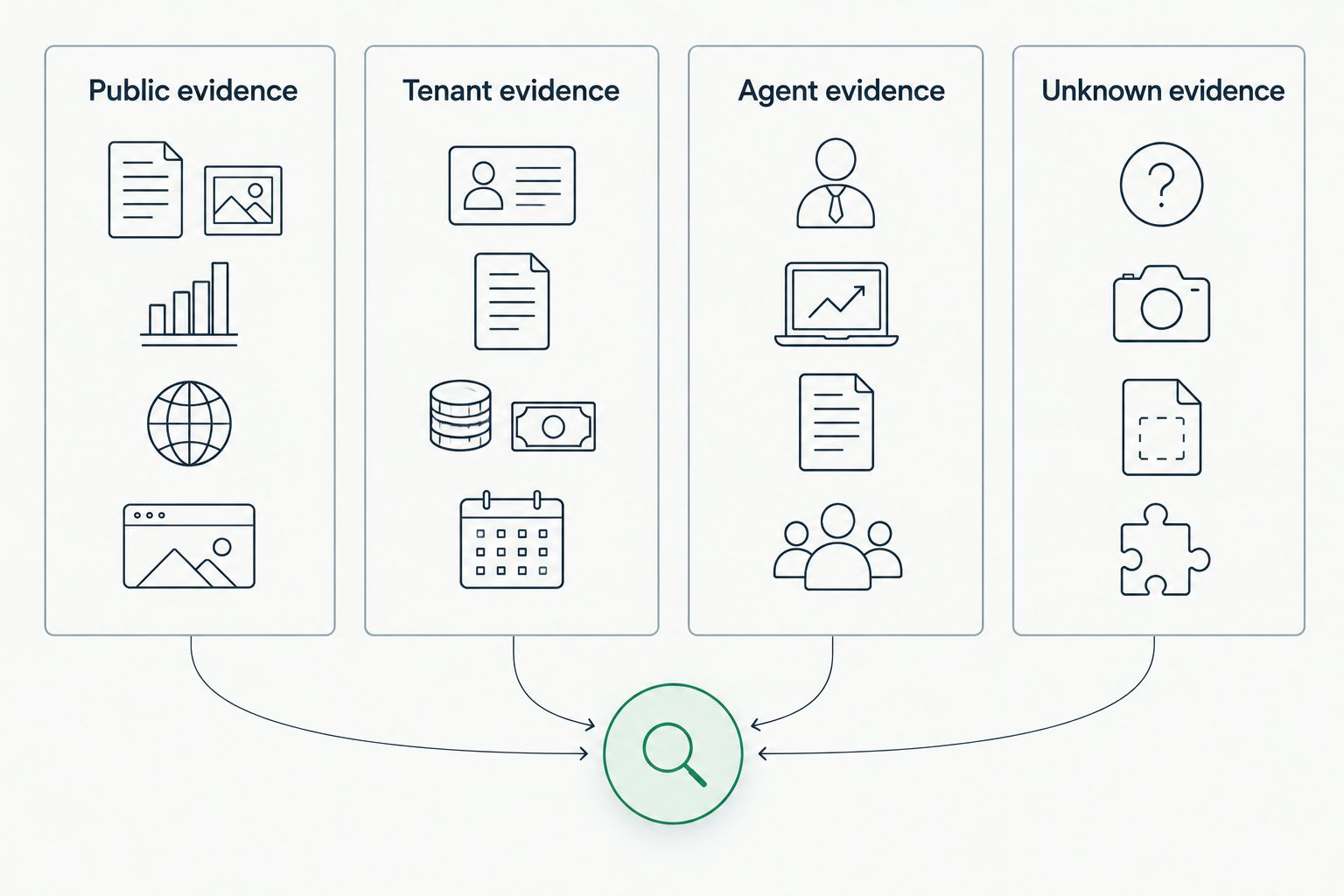
Your evidence register should make a narrow finding easy to recognize. Include the actual observation date, not merely the date on the proposal cover. A 2026 document containing an older observation still needs that observation’s original timestamp.
Test data boundaries and action controls
Start with configuration review and a controlled walkthrough. Use synthetic content and a client-approved test environment or workflow. Do not introduce real sensitive documents simply to demonstrate that an agent can retrieve them.
Review both inputs and outputs. Connected documents, messages, and web content can contain instructions that conflict with the intended task. Prompt injection testing examines whether such content can redirect the agent or influence its tool use; it does not prove safety across every possible input.
Separate reading from acting. An agent that summarizes a message presents a different control question from an agent that sends messages, changes records, or grants access.
Use an authorized test plan:
- Identify which data sources the agent can read.
- Check whether retrieval respects the intended access boundary.
- Test conflicting instructions using harmless synthetic content.
- Inspect approval requirements for sending, deleting, or changing records.
- Confirm the scope of any allowlist for tools or destinations.
- Record test conditions and exceptions without generalizing beyond them.
Turn observations into client decisions
Write the finding in plain language before adding severity labels. Describe what you observed, explain the control question it creates, and show the supporting evidence. Keep a proposed consequence distinct from an event that actually occurred.
For example, a permission granting access to mailbox content supports a question about whether that access is necessary. It does not establish that messages were extracted, that the client suffered harm, or that the permission is currently inappropriate for the agreed workflow.
Build each finding around evidence, insight, and proof. Evidence is the observation. Insight is its relevance to the client’s stated workflow. Proof is the supporting record and the method for verifying any agreed change.
Use these fields in the client document:
- Evidence: state the source, date, scope, and observed configuration.
- Insight: explain the decision the client needs to make.
- Proof: attach the supporting record and proposed verification method.
- Limits: identify unread evidence and untested behavior.
- Owner: name who can approve or implement the next action.
A finding is not a reason to claim buying intent. In a prospect conversation, ask whether the workflow exists and whether an authorized review is useful. In a customer review, tie the decision to the agreed scope rather than speculative breach costs.
Verify containment and recovery
Review the client’s documented controls before proposing changes. Establish who can disable an agent, revoke its access, stop a scheduled workflow, or disconnect a tool. Confirm which records remain available after those actions.
Do not test destructive changes during a prospect review. A read-only assessment identifies control questions; an operational test requires separate authorization and a plan for service impact.
For an authorized customer review, allocate a 60-minute walkthrough as a scheduling starting point. Use it to trace responsibilities and identify unanswered questions, not to certify recovery readiness.
Document the response path:
- Name the person authorized to stop the agent.
- Identify the controls for revoking credentials and connections.
- Record where execution and application logs are retained.
- Identify downstream actions that require separate reversal.
- Agree on approval and escalation responsibilities.
- Mark recovery procedures that have not been demonstrated.
Agree on the next review and proof of completion
Close the review with a bounded work plan. Separate discovery, approved changes, and verification so the client knows which work is complete. A proposal should not describe an untested recommendation as a delivered safeguard.
For your 2026 proposal, attach the evidence date to each finding and define what will count as completion. After an authorized change, schedule a 7-day follow-up as a planning checkpoint for collecting fresh evidence. Use a different interval when the client’s change process requires it.
Bring the same register into QBRs. Compare current evidence with earlier observations, but do not call an item resolved solely because it disappeared from a report.
Close with these deliverables:
- List approved actions separately from proposed actions.
- Assign an owner and an agreed completion date.
- Define the configuration or test result required for verification.
- Collect fresh evidence after the approved change.
- Preserve exceptions and unread evidence in the follow-up record.
- Bring outstanding decisions into the next QBR.
For MSP prospect preparation with SCOUTz, Join Open Beta is the next step. Keep the scope distinction intact: dated prospect evidence prepares a conversation; customer authorization permits the deeper review.
Compare review options for MSPs
Choose the approach according to the question you need to answer. For a 2026 review, no single evidence source establishes public exposure, tenant configuration, and agent execution behavior together. Combining sources is useful only when their dates and limits remain visible.
| Option | Best for | Useful evidence | Key limitation |
|---|---|---|---|
| Manual public-domain review | Preparing an externally grounded prospect conversation | Observable domain and email-security records | Does not establish tenant configuration or agent activity |
| Authorized Microsoft 365 review | Examining tenant access relevant to connected workflows | Permissions, consent, and readable configuration within scope | Does not cover agent systems outside the reviewed tenant |
| SCOUTz | MSP prospect preparation using dated domain and Microsoft 365 evidence | Evidence for questions and sales preparation | Does not replace MSP judgment or agent-specific testing |
| Authorized agent workflow testing | Checking a defined agent’s behavior and action controls | Configuration records and controlled test results | Results apply to the tested conditions, not every possible input |
Choose public-domain review for preparation and authorized evidence for client-specific conclusions. Controlled workflow testing belongs after scope and permission are settled. It is not a shortcut around them.
Common mistakes MSPs make
Treating an application inventory as an agent inventory
An application record identifies an application. It does not establish whether an agent uses it or what the business workflow does. Validate that connection with the owner and supporting configuration before naming it an agent finding.
Turning permission into proof of misuse
Permission evidence shows authority, not exercised activity. Keep a broad grant, an observed action, and a confirmed security event separate in both the technical record and the owner-facing explanation.
Reporting unread evidence as clean
An inaccessible setting is unknown. A missing record can also reflect collection limits or scope. Label the gap and assign the verification question instead of presenting a reassuring result.
Selling remediation before confirming the workflow
A public observation can open a useful discussion. It does not establish an unresolved client problem or a need to buy. Confirm relevance, authorization, and current conditions before proposing changes.
Testing without a service-impact agreement
Agent tests can interact with connected systems. Agree on synthetic data, permitted actions, stop conditions, and responsibility before testing. Keep production changes outside a read-only review.
FAQ
What is AI agent security for MSPs?
AI agent security for MSPs is the review of agent identities, permissions, data access, and actions to define a client control plan. Findings need a source, observation date, scope, and stated limits.
Can an MSP assess AI agent security from a client’s domain alone?
A domain-only review cannot establish AI agent permissions or runtime behavior. Public-domain evidence supports externally grounded questions, while tenant and agent conclusions require the relevant authorized evidence.
Is Microsoft 365 consent evidence proof that an agent accessed data?
Microsoft 365 consent evidence is not proof that an agent accessed data. It shows granted authority; activity records and workflow evidence answer whether and how that authority was exercised.
What should an MSP check first during an AI agent review?
Start with scope, ownership, and authorization. Then trace the agent’s execution identities, connected systems, permissions, and available evidence before testing behavior.
Does SCOUTz replace agent security testing?
SCOUTz does not replace agent-specific testing or MSP judgment. Its dated domain and Microsoft 365 evidence supports prospect preparation, while direct workflow testing addresses the behavior of a defined agent.
How should an MSP report evidence it cannot read?
Report unread evidence as unknown, not clean. State the access or scope limit and identify the authorized follow-up needed to answer the question.
What belongs in an evidence-led AI agent proposal?
An evidence-led AI agent proposal needs dated observations, their limits, approved actions, owners, and a verification method. Keep proposed work separate from completed changes and demonstrated results.
One last thing
Before sending your 2026 review, check every sentence containing the word can. Does it describe a documented permission, a demonstrated action, or an untested possibility? Those are different claims. Label the distinction, and your client gets a decision they can defend rather than a warning they cannot verify.


